Posts

#DIYDGS - Game Managing Software

 I've been using lots of software to try and manage the games I'm trying to run. Because my main focus is running on windows, all these applications are run on this operating system. A lot of them require steep learning curves to get them running. And even then, whether the software is usable is the other question. Here's a list of the programs I tried and if they were usable: Game Server Manager - Multiple Games FASTER - Arma 3 Torch Server - Space Engineers AMP Server - Multiple Games Instances Windows Game Server  - Multiple Games Instances Steam CMD - Manual Server Setup - Steam Setup Random Software - Docker I'll go over each of the programs mentioned above. Some, I will just give the basics. But will go over the software I use the most. Next>> The basics - Learning about Steam_CMD
#DIYDGS - The Hardware I'm Using...

Image
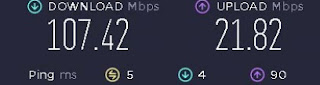
Ok, here's what I've got to help run my dedicated servers. The Hardware I have a PC/Server at home that I use for running Plex and also occasionally game servers.  Its not the best server, but I'll give you the specs for it now: CPU: Intel Pentium G4560 - LGA1151 MBoard: GIGABYTE B150M-D3H-CF - Intel B150 Graphics: Onboard - Intel HD Graphics 610 RAM: 16 GB DDR 4 - 2666 Drives: 1x 120gb M2 (Windows)             1x 512 GB (Dedicated Servers)             3 x 4 TB (Movies, TV Shows)             1x 3TB (Old Movies) OS: Windows 10 Network: Ethernet to Router (Fiber link... It's kinda fast) So as you can see, its not much of a server machine, but its good enough. This machine is setup and running in my spare room at home. It's just hooked up to power and network.. that's its. The Software I have Windows 10 installed, but have disabled most ...

Do It Yourself - Dedicated Gaming Servers - #DIYDGS

Hi all, its been a while. I have a love of gaming, but my real interest is hosting and running games. I've always done it since the old days, when my group, Tweak.net.nz, had LAN party weekends. (see my old website at Wayback Machine - Tweak.net.nz - in 2004   till   in 2017 ) I've always been interested in it. Learning about the games and building or hosting the server for everyone to play on. Back then it was a couple of games that I use to build and run server for: Counterstrike  1.6 Counterstrike Source Battlefield 1942, 2, Desert Combat Arma Delta Force Rainbow 6 Vegas  Now a days my interest is in the following games and their dedicated servers: Arma 3 - #Arma3_DIYDGS Space Engineers - #SE_DIYDGS Valheim - #Valheim_DIYDGS So for the next few posts, I will show you how to setup a server using a variety of dedicated server programs and methods.  Just like the other posts on the blog, its really a record of what I'm doing, so I can refer back to here, wh...

Another windows 10 glitch (100% disk usage)

Image
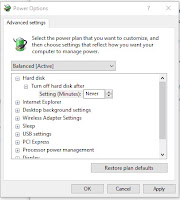
I've been having issues with a couple of HP machines but it looks like, with this particular one HP 27 AIO that seem to have this problem. It seems to freeze up the pc for a few seconds and then continue working.  I thought it was an issue with the Hard Drive or the memory and upgrade both anyway.. but still had the issue. But the solution was easier then editing any Registrations. go to your search area and type in "Power Settings" click on the option "Power & Sleep Settings" On the far right side click on the "Additional Power Settings" If you have it on any of the preferred plans click on the "Change Plan Settings" Click on "Change Advanced Power Settings" at the bottom of the window Go to the settings for the Hard Disk and change the setting to "Never". It should disable it.

Weird Glitch in Win10

I had an issue with a laptop that wasn't usable. The processor and disk use was all pushing out to 100 percent. So I check the net and found a solution that actually worked. I found it here: https://www.drivereasy.com/knowledge/100-disk-usage-windows-10-fixed/#g Other options could also fix the issue, but I found that Fix 6# that was submitted by a reader called Javier, which I feel like I may have used something from this user before. So follow these steps: Fix your StorAHCI.sys driver We need to find out what the device name is for the hard drive. Right click your mouse on the start button on the bottom left. When the menu opens, click on the option "Device Manager" Find and expand the "IDE ATA/ATAPI controllers" category and find the device "Standard SATA AHCI Controller". Go to the Drive tab for the device, and click on "Driver Details". If you can see storahci.sys stored in a path of system32 folder, then you are running t...

Forget that Last post.... Making a copy of a switch... so easy...

Making a copy of the original switch configuration (Allied Telesis AT-8000GS/24) Install Tera Term Telnet to the switch you want to make a copy of. Use ip and the user/pass expand the window to maximum use the command: sh run Keep pressing the spacebar till you reach the console #. Copy all of the text that was printed on screen, after the "sh run" command down to before the console # and paste it into a txt file in notepad. Save the file as the name of the switch you copied this from, but its only the text in the file you need. Quit out of Telnet Copying the config to the new switch Using a console cable (DB9_F to RJ45 and BD9_M to USB) connected, and using Tera Term do the following: Change Tera Term from SHH to Serial at the bottom left. Make sure its the right ComPort. Press ok. expand the window to maximum  change setup>serial port> Speed: 115200 Press enter to get the prompt Enter user/pass enter the following command at the prompt - cons...

Configuring Allied Telesis Switches with PuTTy

Image
Configuring Allied Telesis Switches Using Putty, change connection type to Serial, then change the com port to what your console cable rj45 to usb is coming up as in the device manager (Com5) and change the speed to 115200. In the console, use the default logins: manager/friend to login to the switch. User the following to reconfigure the switch: console# configure console(config)# interface vlan 1 console(config-if)# ip address 100.1.1.1 255.255.0.0 console(config-if)# exit console(config)# ip default-gateway 100.1.1.254 console(config)# exit To check the settings: console# show ip interface