Working with Proxmox Resizing Containers in Proxmox See original details here: https://forum.proxmox.com/threads/resize-lxc-disk-on-proxmox.68901/ On your proxmox node, do this. 1. List the containers: pct list 2. Stop the particular container you want to resize: pct stop 999 3. Find out it's path on the node: lvdisplay | grep "LV Path\|LV Size" 4. For good measure one can run a file system check: e2fsck -fy /dev/pve/vm-999-disk-0 5. Resize the file system: resize2fs /dev/pve/vm-999-disk-0 10G 6. Resize the local volume lvreduce -L 10G /dev/pve/vm-999-disk-0 7. Edit the container's conf, look for the rootfs line and change accordingly: nano /etc/pve/lxc/999.conf rootfs: local-lvm:vm-999-disk-0,size=32G >> rootfs: local-lvm:vm-999-disk-0,size=10G 8. Start it: pct start 999 9. Enter it and check the ...
Posts
Black desktop on domain admin login
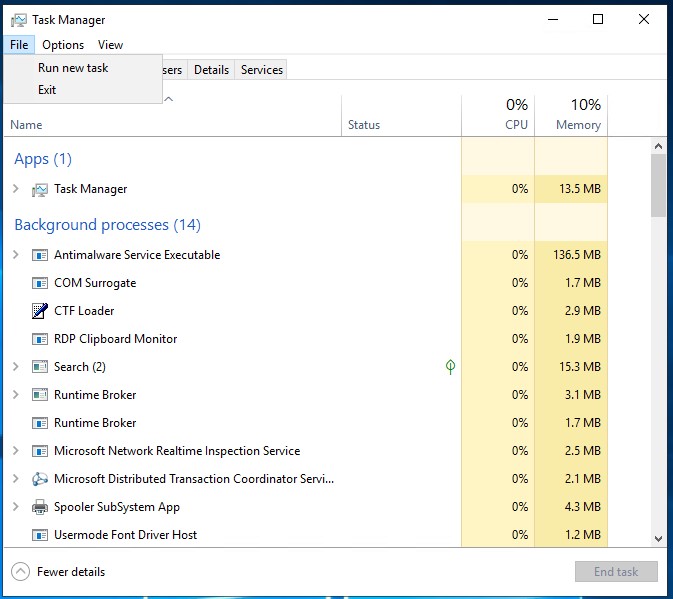
I had just installed server 2019 and could login locally with an account. But after connecting to our local domain, I would get a black desktop when I logged in with the admin domain account. This would happen on both on the server and via remote desktop connection (RDC). After a lot of stuffing around with google search details only relating to black screen on RDC, I eventual found a link to this page: https://community.spiceworks.com/topic/2274333-server-2019-black-screen-on-rdp-with-domain-admin-account#entry-9086513 There were a lot of suggestions, which were good, but the one that worked for me was a solution from the user mimo1313 : Hello All, I had the same problem with server 2019. Change following setting in local GPO: Computer Configuration->Windows Settings->Security Settings->Local Policies->Security Options Enable "User Account Control: Admin Approval Mode for the Built-in Administrator account" which is set to "Not Defined" After that do a...
FASTER - Arma 3 Server Manager (#Arma3_DIYDGS) Part 1

FASTER There are lots of applications you can use for running an Arma Dedicated server, but I use this application that makes it really easy to operate a server FASTER is " an extended rewrite of FAST2 and FAST, a server tool made by Flax to manage Arma 3 Servers." Installing FASTER After downloading the software from the forum or here: https://github.com/Foxlider/FASTER/releases/latest/download/Release_x64.zip Extract the file and place it in a folder that you want it operating from, as you will have to run the application each time. (The configuration files of the software is stored in your user folder in the AppData hidden folder.) With the initial setup of the software, you will need to add the following: Steam Username - This would be your steam details, required by some games. Steam Password - This and if you are using steam guard code will need to be added. Mod Staging Directory - This is a storage directory for your mods. Put this on a hard drive with lots of space. ...
Fingerprint Scanning not working in win11

This title is not totally truthful. The issue turned out to be nothing to do with the scanner or windows 11 really. For me, it was because of the domain login for users. After a lot of funking around, I eventually figured that this was an issue with domain login and the use of using a pin or other type of login. The laptops that I was configuring are Dell Latitude 5420's, which are nice little units. I had reconfigured them for use here I work, but after I handed it over to a user, they asked about using the fingerprint login for their laptop. I went through to the accounts page: Settings > Accounts > Sign-in options And found that all the options for doing this type of login was "This option is currently unavailable". If I clicked on the login method I wanted to use, I also got the error "Something went wrong. Try again later." and the option "Sign in with Windows, apps, and services" and its button "Set up" greyed out, so it couldn...
Google Sheet to Youtube Playlist

I'm always wanting to build my own playlists on YouTube, so I hunted down the way to do it, and got it running and working well. Before you start this, please note: For really long lists you might make, you need to take into account the number of songs you will be loading to your playlist. Using this method requires the use of Google Script App and a quota that is allocated to the process that you will be using, to fetch YouTube addresses and add them to a playlist. From what I can tell, 150-200 songs can be loaded to a YouTube playlist, then it will tell you, you have maxed out your quota limit. To add the rest you will have to wait till the next day to do more. Creating a playlist to load to on YouTube You will need to create a playlist so we can load the songs into. The easiest way to create this, would be to find any song on YouTube and save it to a playlist: At the bottom right of the window, click on the "+ Save" option (A). This will display a list of all...
#DIYDGS - The Basics - Learning Steam_CMD
From what I can figure, most of the game server managing programs use the same background commands that get dedicated software running. I'll go over the commands that I know, but I'm not saying that I know all about this topic... only what's necessary to get shit working right. To download the software, go to this website link for direct download: https://steamcdn-a.akamaihd.net/client/installer/steamcmd.zip For more information also check out: https://developer.valvesoftware.com/wiki/SteamCMD Steam_CMD SteamCMD is a command line application that is used in combination with switches to allow for downloading any of the applications that are available from the Steam library. This includes the dedicated server software. Go to the link above and download it, if you want to test some of these commands. Basic Switches Used There are lots of switches to this commands that can be used but I'm gonna focus on the main ones. And all of these commands are used within a batch file:...
#DIYDGS - Game Managing Software
I've been using lots of software to try and manage the games I'm trying to run. Because my main focus is running on windows, all these applications are run on this operating system. A lot of them require steep learning curves to get them running. And even then, whether the software is usable is the other question. Here's a list of the programs I tried and if they were usable: Game Server Manager - Multiple Games FASTER - Arma 3 Torch Server - Space Engineers AMP Server - Multiple Games Instances Windows Game Server - Multiple Games Instances Steam CMD - Manual Server Setup - Steam Setup Random Software - Docker I'll go over each of the programs mentioned above. Some, I will just give the basics. But will go over the software I use the most. Next>> The basics - Learning about Steam_CMD
#DIYDGS - The Hardware I'm Using...
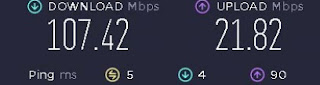
Ok, here's what I've got to help run my dedicated servers. The Hardware I have a PC/Server at home that I use for running Plex and also occasionally game servers. Its not the best server, but I'll give you the specs for it now: CPU: Intel Pentium G4560 - LGA1151 MBoard: GIGABYTE B150M-D3H-CF - Intel B150 Graphics: Onboard - Intel HD Graphics 610 RAM: 16 GB DDR 4 - 2666 Drives: 1x 120gb M2 (Windows) 1x 512 GB (Dedicated Servers) 3 x 4 TB (Movies, TV Shows) 1x 3TB (Old Movies) OS: Windows 10 Network: Ethernet to Router (Fiber link... It's kinda fast) So as you can see, its not much of a server machine, but its good enough. This machine is setup and running in my spare room at home. It's just hooked up to power and network.. that's its. The Software I have Windows 10 installed, but have disabled most ...
Do It Yourself - Dedicated Gaming Servers - #DIYDGS
Hi all, its been a while. I have a love of gaming, but my real interest is hosting and running games. I've always done it since the old days, when my group, Tweak.net.nz, had LAN party weekends. (see my old website at Wayback Machine - Tweak.net.nz - in 2004 till in 2017 ) I've always been interested in it. Learning about the games and building or hosting the server for everyone to play on. Back then it was a couple of games that I use to build and run server for: Counterstrike 1.6 Counterstrike Source Battlefield 1942, 2, Desert Combat Arma Delta Force Rainbow 6 Vegas Now a days my interest is in the following games and their dedicated servers: Arma 3 - #Arma3_DIYDGS Space Engineers - #SE_DIYDGS Valheim - #Valheim_DIYDGS So for the next few posts, I will show you how to setup a server using a variety of dedicated server programs and methods. Just like the other posts on the blog, its really a record of what I'm doing, so I can refer back to here, wh...
Another windows 10 glitch (100% disk usage)
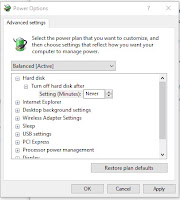
I've been having issues with a couple of HP machines but it looks like, with this particular one HP 27 AIO that seem to have this problem. It seems to freeze up the pc for a few seconds and then continue working. I thought it was an issue with the Hard Drive or the memory and upgrade both anyway.. but still had the issue. But the solution was easier then editing any Registrations. go to your search area and type in "Power Settings" click on the option "Power & Sleep Settings" On the far right side click on the "Additional Power Settings" If you have it on any of the preferred plans click on the "Change Plan Settings" Click on "Change Advanced Power Settings" at the bottom of the window Go to the settings for the Hard Disk and change the setting to "Never". It should disable it.
Weird Glitch in Win10
I had an issue with a laptop that wasn't usable. The processor and disk use was all pushing out to 100 percent. So I check the net and found a solution that actually worked. I found it here: https://www.drivereasy.com/knowledge/100-disk-usage-windows-10-fixed/#g Other options could also fix the issue, but I found that Fix 6# that was submitted by a reader called Javier, which I feel like I may have used something from this user before. So follow these steps: Fix your StorAHCI.sys driver We need to find out what the device name is for the hard drive. Right click your mouse on the start button on the bottom left. When the menu opens, click on the option "Device Manager" Find and expand the "IDE ATA/ATAPI controllers" category and find the device "Standard SATA AHCI Controller". Go to the Drive tab for the device, and click on "Driver Details". If you can see storahci.sys stored in a path of system32 folder, then you are running t...
Forget that Last post.... Making a copy of a switch... so easy...
Making a copy of the original switch configuration (Allied Telesis AT-8000GS/24) Install Tera Term Telnet to the switch you want to make a copy of. Use ip and the user/pass expand the window to maximum use the command: sh run Keep pressing the spacebar till you reach the console #. Copy all of the text that was printed on screen, after the "sh run" command down to before the console # and paste it into a txt file in notepad. Save the file as the name of the switch you copied this from, but its only the text in the file you need. Quit out of Telnet Copying the config to the new switch Using a console cable (DB9_F to RJ45 and BD9_M to USB) connected, and using Tera Term do the following: Change Tera Term from SHH to Serial at the bottom left. Make sure its the right ComPort. Press ok. expand the window to maximum change setup>serial port> Speed: 115200 Press enter to get the prompt Enter user/pass enter the following command at the prompt - cons...
Configuring Allied Telesis Switches with PuTTy

Configuring Allied Telesis Switches Using Putty, change connection type to Serial, then change the com port to what your console cable rj45 to usb is coming up as in the device manager (Com5) and change the speed to 115200. In the console, use the default logins: manager/friend to login to the switch. User the following to reconfigure the switch: console# configure console(config)# interface vlan 1 console(config-if)# ip address 100.1.1.1 255.255.0.0 console(config-if)# exit console(config)# ip default-gateway 100.1.1.254 console(config)# exit To check the settings: console# show ip interface
GAM and Commands to Remember
Reminders about using GAM for Google Admin I've been working with Google Admin for a while, but when it comes to organising users at the beginning of the year, I keep loosing the details that I need to complete the tasks. So I'm putting details into this post about what commands I need to remember and the steps for this. Print out all users in an organisation This command will print all of the details of users in your domain. This will give me their account and most importantly, their organisation unit. gam print users allfields > users.csv Changing users to other organisational units This command will allow me to use a text file I've created from the download of all the user details to move users from OUs to elsewhere. The text file only needs the first part of the email address, minus "@blah.com" gam file users.txt update user org "/Users/Leaving" Bulk upload of new users To do this, I need to get the list of the new users with the fol...
Using AMP to create an Arma 3 Instance Dedicated Server (AMP & Arma 3)

I've been wanting to use AMP for a while now to see if I could manage my game servers a little easier, and AMP might be the way. AMP is: " AMP is short for Application Management Panel. It's our next-generation server administration software built for both users, and service providers. It supports both Windows and Linux based servers and allows you to manage all your game servers from a single web interface." I'm using my windows10 mini pc to install AMP on to. but to save hassle, I would suggest doing what they have mentioned on their wiki and in these instructions. https://cubecoders.com/AMPInstall ( Click the windows installation version.) They mention that it would be better to create a user called AMP to administer the server. So remember to create a new user and add AMP as a admin before installing. right click on the start button, and in the menu click on "computer management" click on "local Users and Groups" then click o...
Macbook Air Issue
I had an issue with a Macbook Air where it was not starting up properly and displaying a message of: "MacOS could not be installed on your computer Storage system verify or repair failed. Quit the installer to restart your computer and try again." It would boot into this error and would not come out of it if restarted, and trying some of the many suggestions on how to fix it: Use disk utilities and First Aid on the drive and reboot to get it working. Booting into recovery mode by holding Command & R, and trying the same thing as above with the disk utility. Free up space on your drive for the update. Downloading the update and installing it manually. The only way around it was to go into Safe boot, (by holding the Shift key when the OS starts) which is what I did to try the manual update. I could back up all the files with this method so that was good. I found the solution on a youtube video, (https://www.youtube.com/watch?v=mXcUWg4199Q) which suggest...
Creating a TorrentPi - Installing the Main OS
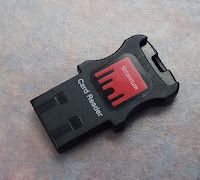
For this part of the work-thru, I wanted my Raspi to have as little on it as possible, so more of it could be focused on Torrenting Legal Content. For this part of the project, you will need the following: 1 x Raspberry Pi 2+ 1 x 5v/2A power adaptor for Raspberry Pi 1 x 8 Gb MicroSD card 1 x MicroSD to USB Adaptor 1 x HDMI capable monitor and HDMI cable 1 x Wireless keyboard/ Mouse 1 x Wireless Adaptor or Lan Cable for internet connectivity Also a PC or Laptop to help with installing the OS. Setting Up First off, we need to find an OS that we can use with the Raspberry Pi. I have chosen to use Raspbian as its comes with a light edition: https://www.raspberrypi.org/downloads/raspbian/ Download the lite edition, which in my case and at the time of setting up was: Raspbian Stretch Lite - 2017-11-29 Ver 4.9...
Radio Station Pi
Using Raspberry Pi to stream audio (from a Windows pc) to a PA system I've been looking at some of the projects available out there for Raspberry Pi, and I'm trying to find something to occupy my time as a hobby. I really like working with the Raspberry Pi (I've only got version b+) and have been trying different projects out. One of the projects I successfully created was using a pi to be a digital display unit in the foyer of the school I work at. After experimenting with a few things, (Feh and PiPresents) I've got it working well (with PiPresentsNext) which also includes NAS on the Pi, with a "aways live" folder accessible from pcs on the network. As a picture or video is added, it will automatically add it to the current slideshow of photos and videos. :) I also added the pandora/pianobar process to it too, so I can have it play music if I want. I might add my method I used to build it on here. One project that wasn't successful, was trying to ...