Posts

GAM and Commands to Remember

Reminders about using GAM for Google Admin I've been working with Google Admin for a while, but when it comes to organising users at the beginning of the year, I keep loosing the details that I need to complete the tasks. So I'm putting details into this post about what commands I need to remember and the steps for this. Print out all users in an organisation This command will print all of the details of users in your domain. This will give me their account and most importantly, their organisation unit. gam print users allfields > users.csv Changing users to other organisational units This command will allow me to use a text file I've created from the download of all the user details to move users from OUs to elsewhere. The text file only needs the first part of the email address, minus "@blah.com" gam file users.txt update user org "/Users/Leaving" Bulk upload of new users To do this, I need to get the list of the new users with the fol...

Using AMP to create an Arma 3 Instance Dedicated Server (AMP & Arma 3)

Image
I've been wanting to use AMP for a while now to see if I could manage my game servers a little easier, and AMP might be the way. AMP is: " AMP is short for Application Management Panel. It's our next-generation server administration software built for both users, and service providers. It supports both Windows and Linux based servers and allows you to manage all your game servers from a single web interface." I'm using my windows10 mini pc to install AMP on to. but to save hassle, I would suggest doing what they have mentioned on their wiki and in these instructions. https://cubecoders.com/AMPInstall ( Click the windows installation version.) They mention that it would be better to create a user called AMP to administer the server. So remember to create a new user and add AMP as a admin before installing. right click on the start button, and in the menu click on "computer management" click on "local Users and Groups" then click o...

Macbook Air Issue

I had an issue with a Macbook Air where it was not starting up properly and displaying a message of: "MacOS could not be installed on your computer  Storage system verify or repair failed. Quit the installer to restart your computer and try again." It would boot into this error and would not come out of it if restarted,  and trying some of the many suggestions on how to fix it: Use disk utilities and First Aid on the drive and reboot to get it working. Booting into recovery mode by holding Command & R, and trying the same thing as above with the disk utility. Free up space on your drive for the update. Downloading the update and installing it manually. The only way around it was to go into Safe boot, (by holding the Shift key when the OS starts) which is what I did to try the manual update. I could back up all the files with this method so that was good. I found the solution on a youtube video, (https://www.youtube.com/watch?v=mXcUWg4199Q) which suggest...

Creating a TorrentPi - Installing the Main OS

Image
For this part of the work-thru, I wanted my Raspi to have as little on it as possible, so more of it could be focused on Torrenting Legal Content. For this part of the project, you will need the following:      1 x Raspberry Pi 2+            1 x 5v/2A power adaptor for Raspberry Pi       1 x 8 Gb MicroSD card      1 x MicroSD to USB Adaptor      1 x HDMI capable monitor and HDMI cable      1 x Wireless keyboard/ Mouse      1 x Wireless Adaptor or Lan Cable for internet connectivity Also a PC or Laptop to help with installing the OS. Setting Up First off, we need to find an OS that we can use with the Raspberry Pi. I have chosen to use Raspbian as its comes with a light edition: https://www.raspberrypi.org/downloads/raspbian/ Download the lite edition, which in my case and at the time of setting up was: Raspbian Stretch Lite - 2017-11-29 Ver 4.9...

Radio Station Pi

Using Raspberry Pi to stream audio (from a Windows pc) to a PA system I've been looking at some of the projects available out there for Raspberry Pi, and I'm trying to find something to occupy my time as a hobby. I really like working with the Raspberry Pi (I've only got version b+) and have been trying different projects out. One of the projects I successfully created was using a pi to be a digital display unit in the foyer of the school I work at. After experimenting with a few things, (Feh and PiPresents) I've got it working well (with PiPresentsNext) which also includes NAS on the Pi, with a "aways live" folder accessible from pcs on the network. As a picture or video is added, it will automatically add it to the current slideshow of photos and videos. :) I also added the pandora/pianobar process to it too, so I can have it play music if I want. I might add my method I used to build it on here. One project that wasn't successful, was trying to ...

Sysprep Issue

I've been trying to create an WDS image of a Lenovo T430 laptop, but for some screwed up reason, I haven't been successful, so I gave up on trying and tried booting the laptop back to the desktop. Unfortunately the sysprep caused an error when trying to boot the laptop. It got stuck in a loop saying that the laptop is 'Setup is starting services' and reboot which creates a loop. A user at Microsoft Answers had a solution: User: gpsac Answered with: Ran into this with a Gateway "All in One". A friends machine and someone must have inadvertantly lauched a reinstall or something. Anyway, I found the below instructions in another forum and they worked for this Gateway. 1) On the same error screen press SHIFT+F10 and it will open up a black Window. (a command prompt window) 2) In the black windows type the word "regedit"(without the inverted commas and hit enter. That will open the registry editor. In the Registry Editor.. Browse to.... HKLocal machine/...

Googleupdate.exe error... Whitelist Issue

Image
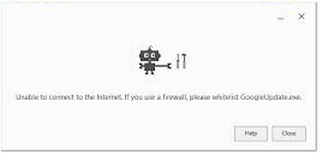
Thanks to a fellow Google chrome user:  Vardhman Soni He has a fix for the error you can get when to try to install Google Chrome and you get the following error: I've also had this issue with using Google Sync for Outlook as well. You can watch his video on how to fix it below: how to whitelist googleupdate.exe in firewall in just 3 minutes Solution. https://www.youtube.com/watch?v=uYXM8QkLgT0